
Faculty Feedback Form with Javascript Validation
 Ojas Deshpande

Faculty Feedback Form with Javascript Validation
End-of-semester feedback at our university still runs on paper. Eight subjects, eleven teachers, four rating dimensions per teacher, and a stack of forms that someone has to count by hand. The data-entry work is the part nobody talks about. For our first-year mini project in Web Application Development (BTECES26104), four of us built a browser form that replaces the paper stack with a two-page flow and a star rating that works without an icon library or a framework.
Course and Team
We submitted it for Web Application Development (BTECES26104), Semester I of B.Tech CSE at Vishwakarma University, Pune, Division C-C1, under Prof. Prachiti Suryavanshi. The team was Ojas, Ashutosh, Anvi and Tanushree. Everything ships as three files: index.html (192 lines), styles.css (466 lines), script.js (267 lines), plus Assets/VU_logo.png. No build step, no package.json, no dependencies. The full report, presentation and screenshots live in the university submission.
1. The Two-Page State Machine
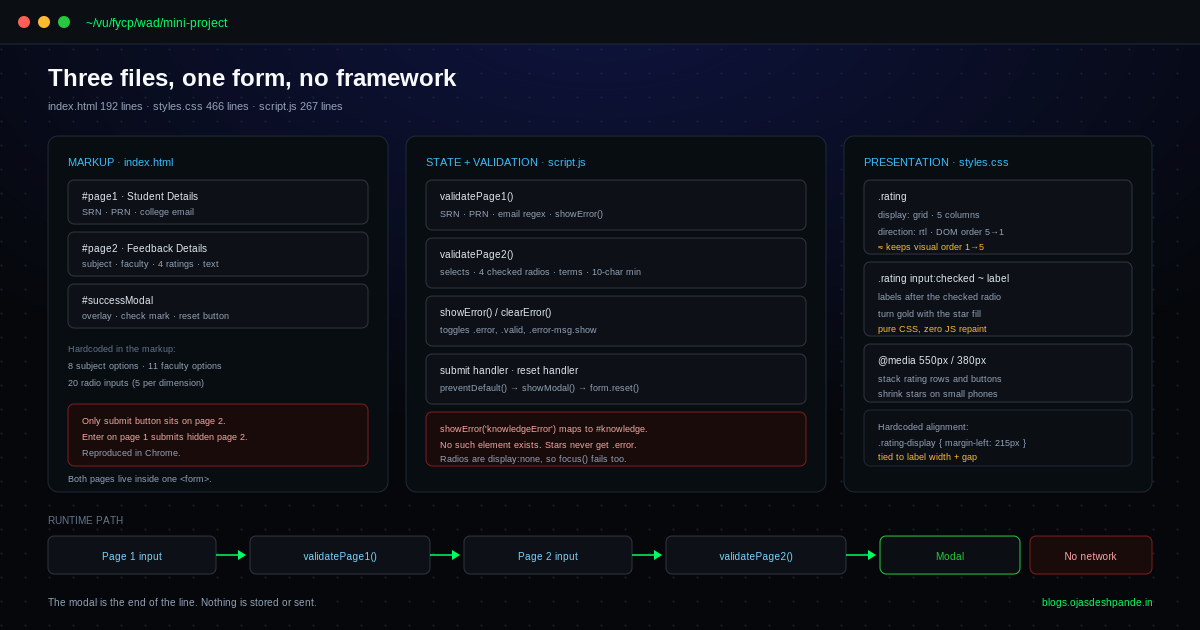
The form lives inside one <form id="feedbackForm" novalidate>. Page 1 (#page1) collects SRN, PRN and college email, then shows a Next button (type=button). Page 2 (#page2, initially display:none) collects subject, faculty, four 5-star ratings, two optional textareas with live character counters, a required confirmation checkbox, and the only type=submit button in the document. A success modal (#successModal) appears when validatePage2() returns true.
This single-form design is where the first bug lives. Because both pages share the same <form>, pressing Enter while focused in SRN triggers implicit form submission. The browser runs validatePage2() against the hidden page 2. The user stays on Step 1 and sees nothing, while seven errors populate the invisible page 2 (subject, faculty, four ratings, terms). We reproduced this in headless Chrome against the real files.
2. Validation Layer
validatePage1() checks SRN (/^3126\d{4,}$/), PRN (/^3126\d{8,}$/) and email (/^[a-z]+\.[a-z]+26@vupune\.ac\.in$/i). validatePage2() requires a subject value, a faculty value, one checked radio per rating group, and the terms checkbox. Strengths and improvements are optional but enforce a 10-character minimum and a 300-character maximum if filled.
Error handling uses showError(id,msg) and clearError(id). Both derive the input element with document.getElementById(id.replace('Error','')), then toggle .show on the error span and .error or .valid on the input. The first-error focus path does querySelector('.error'), then .focus() and .scrollIntoView().
function showError(id, msg) {
    const el = document.getElementById(id);
    const input = document.getElementById(id.replace('Error', ''));
    if (el) { el.textContent = msg; el.classList.add('show'); }
    if (input) { input.classList.add('error'); input.classList.remove('valid'); }
}3. CSS Grid Stars Without SVG or Icons
The rating row is a five-column grid with direction:rtl. The DOM order of the radios is 5, 4, 3, 2, 1 (values 5 through 1). RTL reverses the visual order to 1, 2, 3, 4, 5 from left to right. The radios themselves are display:none. Labels hold the star character (★). Hover and checked styles turn the selected star and all DOM-following labels gold (#f39c12).
.rating {
    display: grid;
    grid-template-columns: repeat(5, 1fr);
    gap: 8px;
    direction: rtl;
}
.rating input { display: none; }
.rating label {
    font-size: 24px;
    color: #ddd;
    cursor: pointer;
}
.rating label:hover,
.rating label:hover ~ label { color: #f39c12; transform: scale(1.1); }
.rating input:checked ~ label { color: #f39c12; }
The meaning text (Extremely Dissatisfied through Extremely Satisfied) appears in a separate .rating-display div below each row. On desktop it has a hardcoded margin-left:215px tied to the label width plus the gap. At the 550px breakpoint the rating rows stack and the margin resets to zero.
4. Bugs We Found
4.1 Enter-Key Trap on Page 1
As described above, the shared <form> and the single type=submit button on page 2 cause implicit submission when Enter is pressed on page 1. The validation runs against hidden fields and produces seven invisible errors. The fix is either event.preventDefault() on keydown for page 1 inputs, or giving the Next button type="submit" and handling the page switch in the submit handler with a page indicator.
4.2 Rating Errors Cannot Be Focused
When subject, faculty and terms are valid but all four ratings are empty, validatePage2() calls showError('knowledgeError'), showError('teachingError'), showError('communicationError') and showError('supportError'). Each maps to an element with id knowledge, teaching, communication or support. Those elements do not exist. The radios are k1..k5, t1..t5, c1..c5, s1..s5. No radio receives the .error class. document.activeElement stays on the body, and calling .focus() on a radio with display:none throws in some browsers and silently fails in others. The first-error focus path does nothing for the most common validation failure.
4.3 The Success Modal Does Not Submit Anything
There is no fetch, no XMLHttpRequest, no form action, no localStorage. showModal() calls form.reset(), which clears SRN, PRN, email, selects, radio choices and both textareas, then shows "Your feedback has been submitted successfully." The data is gone. The project is a front-end demo, not a working submission pipeline.
4.4 Accessibility Gaps
Radios removed from the tab order by display:none make the star rating mouse-only. Labels contain only a star, not the rating value. Error spans lack aria-live. Inputs lack aria-describedby pointing to their error text. The modal has no role="dialog", no aria-modal, no focus trap, no Escape handler, and no focus return. The "Submit Another" button uses an inline onclick handler.
4.5 Hardcoded Data and Early Blur Validation
Eight subjects and eleven faculty are repeated in the HTML and in README.md. Adding a faculty member means editing markup and docs. A data array rendered into options would keep the source of truth in one place. Page 1 validates each field on blur, so tabbing through empty fields paints red errors before the user has typed anything. It is technically correct and socially hostile.
5. Responsive Behavior
Container max-width 700px, body padding 20px. Header flex row. At 550px the header stacks, form padding drops to 20px 15px, rating rows stack, nav buttons stack, and .rating-display margin resets. At 380px star font drops to 18px and inputs stay at 14px to avoid iOS zoom. The page uses CSS Grid for stars and flexbox elsewhere. No horizontal scroll appears at any width.
6. Test Run
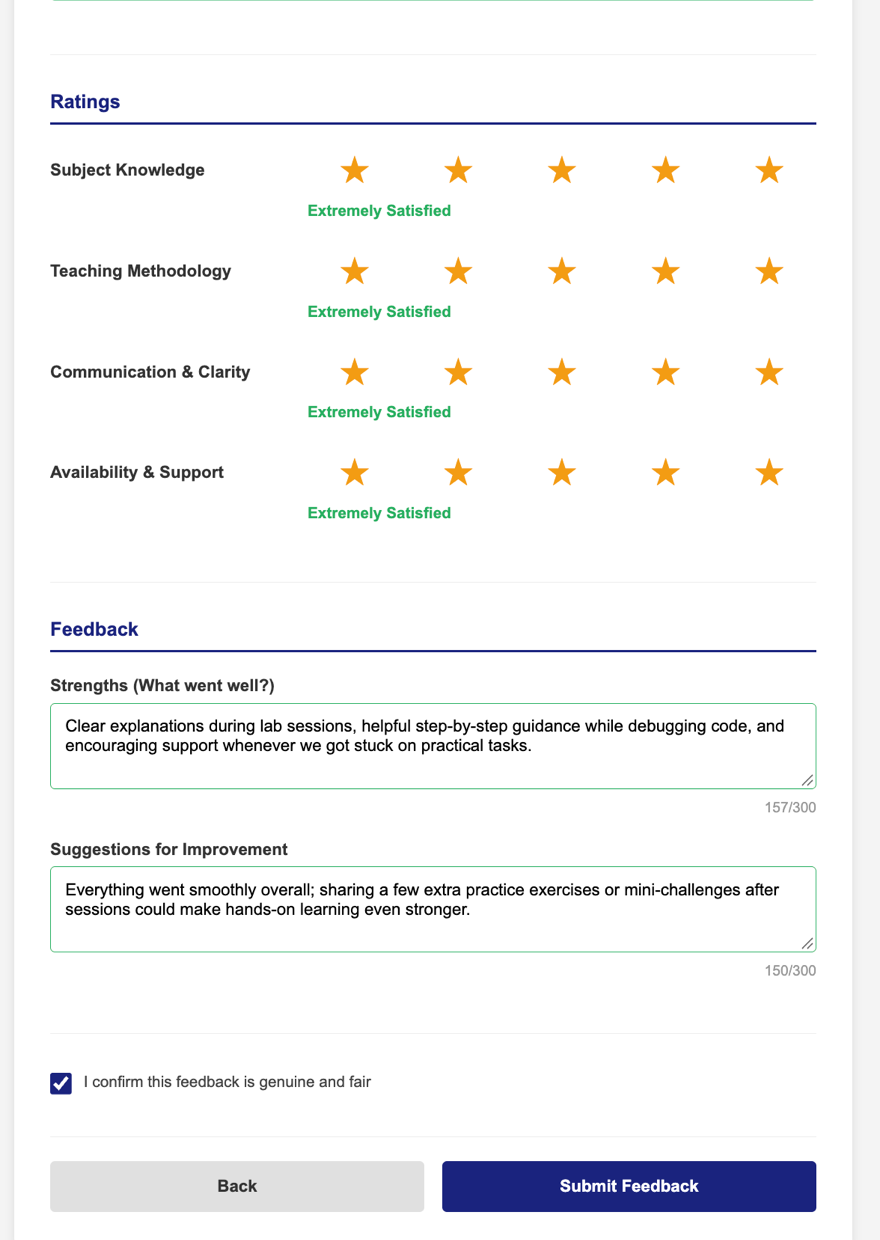
We ran the form at a local static server (python3 -m http.server 8000). Subject: BTECES26104 Web Application Development (Lab). Faculty: 310409 PVS Prachiti Vivek Suryavanshi. All four ratings at 5 ("Extremely Satisfied"). Strengths: 157/300 characters. Improvements: 150/300 characters. Confirmation checked. Submit triggered the success modal. No personal identifiers appear in the screenshots.


7. What We Would Fix
Quick Takeaways
- A single
<form>with multiple hidden pages and only one submit button turns Enter on the first page into a silent validation of the hidden page. - Error-to-input mapping that relies on string replacement (
'Error'→'') breaks when the input IDs do not follow the pattern. Map explicitly or use data attributes. display:noneon native controls removes them from the accessibility tree and the tab order. Visually hidden (opacity 0, position absolute) keeps them reachable.- A success message without a network call or persistent storage is a UI demo, not a feature. Name it honestly.