
Part 7: GitHub Actions II — Advanced Automation & Custom Runners
 Ojas Deshpande
Part 7: GitHub Actions II — Advanced Automation & Custom Runners
In Part 6, we built a fast CI workflow for a single repository. Once your team grows past a handful of services, three new problems show up:
1. You end up copy-pasting the same 150-line deployment YAML across twenty repositories.
2. Someone stores long-lived AWS_SECRET_ACCESS_KEY or GCP_SA_KEY credentials in GitHub Secrets and never rotates them.
3. You need runners that can reach a private VPC database or use a GPU without leaving leftover build state on disk between jobs.
Let's solve all three using Reusable Workflows, OpenID Connect (OIDC), GitHub Environments, and Actions Runner Controller (ARC) on Kubernetes.
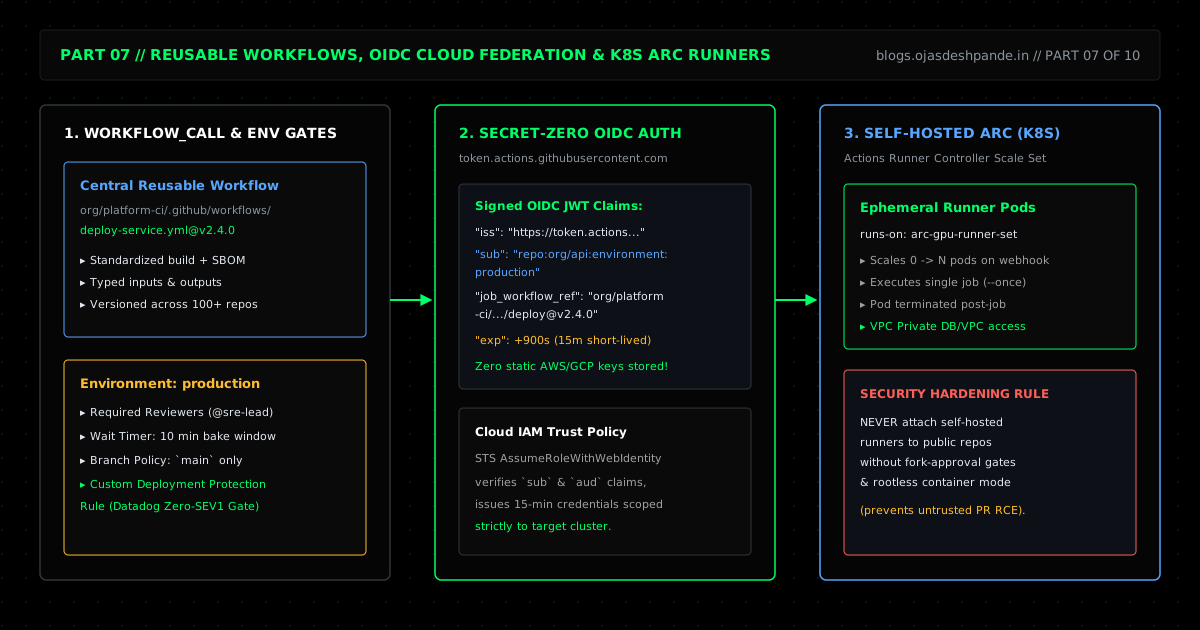
1. Reusable Workflows (workflow_call) vs. Composite Actions
GitHub gives you two ways to share workflow logic without copy-pasting YAML:
- Composite Actions (
action.ymlwithruns: using: "composite"): Packs a few common steps (like setting up Node, pnpm, and custom cache paths) into a single reusable step that runs inside an existing job. - Reusable Workflows (
on: workflow_call): Lets you put an entire multi-job pipeline (build → scan → push image → deploy) inside one central repo (sayAce-Vector-Labs/platform-ci/.github/workflows/deploy.yml@v2.4.0). Every microservice repo can then call that whole pipeline in 10 lines of YAML.
2. Ditching Static Cloud Keys with OIDC (id-token: write)
Pasting static AWS or GCP credentials into GitHub Secrets is a bad habit. Static keys don't expire on their own, they are annoying to rotate across dozens of repos, and if one leaks, an attacker can use it from anywhere.
With OpenID Connect (OIDC), you don't store cloud keys in GitHub at all. When a job runs with permissions: id-token: write, GitHub's OIDC provider (https://token.actions.githubusercontent.com) signs a short-lived JWT containing the exact repository, branch, and environment (repo:Ace-Vector-Labs/payments-api:environment:production). AWS IAM (or GCP / Azure) checks that signature and hands the runner a temporary token that expires in 15 minutes.
3. GitHub Environments & Deployment Gates
Adding environment: production to a deployment job gives you three useful safety checks before a deploy runs:
- Required Reviewers: Pause the deployment job until someone on
@Ace-Vector-Labs/sre-oncallclicks Approve. - Wait Timers: Enforce a 10-minute cooldown after staging before production starts.
- Branch Restrictions: Only allow commits from
mainor signed release tags (v*.*.*) to assume theproductionenvironment role.
4. Ephemeral Kubernetes Runners with Actions Runner Controller (ARC)
Sometimes GitHub's hosted runners aren't enough—you might need 64 GB of RAM, an NVIDIA GPU, or access to a staging database inside a private VPC subnet.
The mistake many teams make is spinning up a static EC2 VM, installing the runner agent on it, and leaving it running forever. Because jobs on a static VM share the same disk and OS, a dirty build or a compromised dependency from one run can linger and affect the next run.
Instead, run Actions Runner Controller (ARC) on Kubernetes using AutoscalingRunnerSet. When a job asks for runs-on: arc-vpc-runners, ARC spins up a fresh Kubernetes Pod, runs one single job, and destroys the Pod as soon as the job finishes.
5. Walkthrough: Reusable OIDC Deployments + Ephemeral ARC Runners
Step 1: Create a Reusable Deployment Workflow (platform-ci)
# Ace-Vector-Labs/platform-ci/.github/workflows/reusable-eks-deploy.yml
name: Reusable OIDC Container Build & EKS Deploy

on:
  workflow_call:
    inputs:
      service_name:
        required: true
        type: string
      aws_region:
        required: false
        type: string
        default: "us-east-1"
      environment_name:
        required: true
        type: string
      iam_role_arn:
        required: true
        type: string

jobs:
  deploy:
    runs-on: arc-vpc-runners
    environment: ${{ inputs.environment_name }}
    permissions:
      contents: read
      id-token: write # Needed to request an OIDC token

    steps:
      - uses: actions/checkout@v4

      - name: Assume AWS IAM Role via OIDC (No static secrets)
        uses: aws-actions/configure-aws-credentials@v4
        with:
          role-to-assume: ${{ inputs.iam_role_arn }}
          role-session-name: gha-${{ inputs.service_name }}-${{ github.run_id }}
          aws-region: ${{ inputs.aws_region }}

      - name: Build, Push & Roll Out Image
        run: |
          IMAGE_TAG="${ECR_REGISTRY}/${{ inputs.service_name }}:${GITHUB_SHA}"
          docker build -t "$IMAGE_TAG" .
          docker push "$IMAGE_TAG"
          kubectl set image deployment/"${{ inputs.service_name }}" \
            app="$IMAGE_TAG" --record=false
          kubectl rollout status deployment/"${{ inputs.service_name }}" --timeout=180s
Step 2: Lock Down the AWS IAM Trust Policy
In AWS IAM, scope the trust policy on arn:aws:iam::123456789012:role/gha-payments-prod so only the production environment of Ace-Vector-Labs/payments-api can assume the role:
{
  "Version": "2012-10-17",
  "Statement": [
    {
      "Effect": "Allow",
      "Principal": {
        "Federated": "arn:aws:iam::123456789012:oidc-provider/token.actions.githubusercontent.com"
      },
      "Action": "sts:AssumeRoleWithWebIdentity",
      "Condition": {
        "StringEquals": {
          "token.actions.githubusercontent.com:aud": "sts.amazonaws.com",
          "token.actions.githubusercontent.com:sub": "repo:Ace-Vector-Labs/payments-api:environment:production"
        }
      }
    }
  ]
}
Step 3: Configure Ephemeral Kubernetes Runners (values.yaml)
# helm/arc-runner-scale-set-values.yaml
githubConfigUrl: "https://github.com/Ace-Vector-Labs"
githubConfigSecret: arc-github-app-secret
runnerScaleSetName: "arc-vpc-runners"
minRunners: 0
maxRunners: 20

containerMode:
  type: "kubernetes"
  kubernetesModeWorkVolumeClaim:
    accessModes: ["ReadWriteOnce"]
    storageClassName: "gp3-encrypted"
    resources:
      requests:
        storage: 15Gi

template:
  spec:
    securityContext:
      runAsNonRoot: true
      runAsUser: 1001
    containers:
      - name: runner
        image: ghcr.io/actions/actions-runner:latest
        command: ["/home/runner/run.sh"]
Quick Checklist
- Switch cloud deploys to OIDC: Use
permissions: id-token: writeand check thesubclaim in your cloud IAM trust policy so you can delete static cloud keys from GitHub Secrets. - Never attach self-hosted runners to public repos without approval gates: Otherwise, anyone can open a fork PR that modifies the workflow file and runs arbitrary commands inside your private network.
- Pin third-party actions to commit SHAs: For community actions outside your org, pin to a full 40-character commit SHA so a compromised upstream tag cannot inject code into your builds.
Series Navigation: ← Previous: Part 6: GitHub Actions I — CI/CD Pipeline Fundamentals | Next: Part 8: Security & Supply Chain Defense → | All Articles