
Part 8: Security & Supply Chain Defense
 Ojas Deshpande
Part 8: Security & Supply Chain Defense
After automating builds and cloud deployments in Part 6 and Part 7, let's talk about keeping leaked credentials and bad dependencies out of your codebase.
Most security incidents in software repos come down to two things: someone accidentally commits an .env file or API token, or an outdated dependency pulls in a known vulnerability. If you catch those after they land on main, cleaning them up is painful. GitHub Advanced Security (GHAS) lets you block both before the code is ever merged.
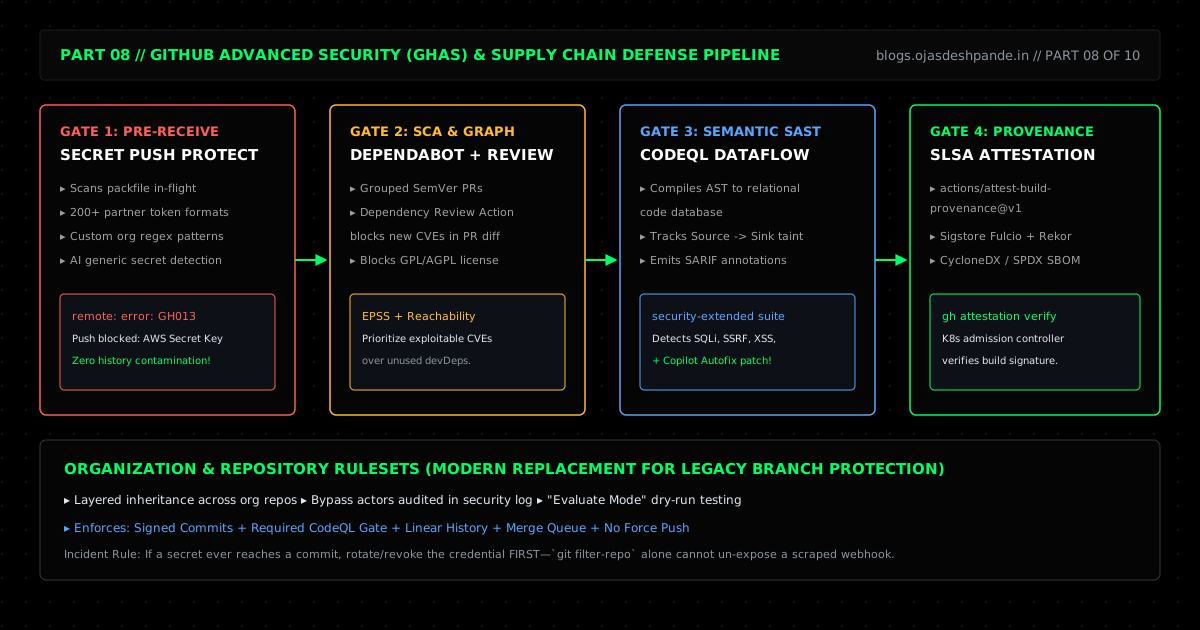
1. Secret Scanning Push Protection
Finding out that an AWS key was pushed to a public repo 30 seconds after the push is already too late—bots scrape public GitHub firehose events in seconds.
Secret Scanning Push Protection checks your commits during git push before GitHub writes them to the remote repo. If GitHub spots a known token format (AWS, Stripe, Slack, OpenAI, GitHub PATs, or a custom regex you defined for your org), it rejects the push right in your terminal (remote: error: GH013) and tells you which commit and line number had the secret. You can then remove the key locally and push again cleanly.
2. Keeping Dependabot Useful (Without Inbox Spam)
If you turn on Dependabot with default settings on a JavaScript project, it will open 25 separate pull requests every Monday morning. After two weeks of that, everyone starts ignoring Dependabot PRs altogether.
Two changes make dependency scanning actually usable:
- Group minor and patch updates in
.github/dependabot.yml: Use thegroups:option to bundle all dev-tooling updates (@types/*, ESLint, test runners) into one single weekly PR, and include thegithub-actionsecosystem so your.github/workflows/*.ymlversions stay updated too. - Run
dependency-review-actionon Pull Requests: While Dependabot checks existing dependencies,actions/dependency-review-action@v4checks new packages added in a PR. If a teammate adds a package with a knownhighorcriticalCVE—or an unexpectedGPL-3.0/AGPL-3.0license—the PR check fails before it can be merged.
3. Static Analysis with CodeQL
Standard linters match text patterns one file at a time. CodeQL compiles your code into a searchable database and tracks dataflow across files—following untrusted user input from a source (like an HTTP query param or webhook body) all the way to a dangerous sink (like a raw SQL query, shell command, or file path). When it spots an unsanitized path, it leaves an inline comment directly on the PR diff.
4. Repository Rulesets & Build Provenance Attestations
- Repository Rulesets: Rulesets are the modern replacement for classic branch protection rules. You can define rules at the Organization level (requiring signed commits, CodeQL checks, and Merge Queues across
main), test new rules in Evaluate Mode to see what would have been blocked without actually blocking engineers, and audit any admin bypasses in one place. - Artifact Attestations (
actions/attest-build-provenance@v1): Uses Sigstore and GitHub OIDC to cryptographically sign your build output so you can verify (gh attestation verify) that a release binary or container was genuinely built by your GitHub Actions workflow and not tampered with afterward.
5. Walkthrough: Grouped Dependabot, CodeQL, and Cleaning Up a Local Secret
Step 1: Group Updates in .github/dependabot.yml
# .github/dependabot.yml
version: 2
updates:
  # 1. App dependencies grouped into at most 2 weekly PRs
  - package-ecosystem: "npm"
    directory: "/"
    schedule:
      interval: "weekly"
      day: "monday"
      time: "06:00"
    open-pull-requests-limit: 5
    groups:
      dev-tooling:
        dependency-type: "development"
        update-types: ["minor", "patch"]
      prod-patches:
        dependency-type: "production"
        update-types: ["patch"]

  # 2. Keep GitHub Actions workflow versions updated
  - package-ecosystem: "github-actions"
    directory: "/"
    schedule:
      interval: "weekly"
Step 2: Add Dependency Review, CodeQL, and Provenance Signing
# .github/workflows/security.yml
name: Security & Supply Chain Checks

on:
  push:
    branches: [main]
  pull_request:
    branches: [main]
  schedule:
    - cron: "30 2 * * 1"

permissions:
  contents: read

jobs:
  dependency-review:
    if: github.event_name == 'pull_request'
    runs-on: ubuntu-latest
    steps:
      - uses: actions/checkout@v4
      - name: Block vulnerable or copyleft packages in PRs
        uses: actions/dependency-review-action@v4
        with:
          fail-on-severity: high
          deny-licenses: GPL-3.0, AGPL-3.0

  codeql:
    runs-on: ubuntu-latest
    permissions:
      contents: read
      security-events: write
    strategy:
      fail-fast: false
      matrix:
        language: [javascript-typescript, python]
    steps:
      - uses: actions/checkout@v4
      - uses: github/codeql-action/init@v3
        with:
          languages: ${{ matrix.language }}
          queries: +security-extended
      - uses: github/codeql-action/analyze@v3
        with:
          category: "/language:${{ matrix.language }}"

  build-and-attest:
    if: github.event_name == 'push' && github.ref == 'refs/heads/main'
    needs: [codeql]
    runs-on: ubuntu-latest
    permissions:
      contents: read
      id-token: write
      attestations: write
    steps:
      - uses: actions/checkout@v4
      - name: Build release bundle
        run: |
          python3 Frontend/build.py
          tar -czf release-bundle.tar.gz Frontend/
      - name: Sign build provenance
        uses: actions/attest-build-provenance@v1
        with:
          subject-path: "release-bundle.tar.gz"
Step 3: What to Do When Push Protection Blocks Your Push
If Push Protection blocks your git push because you accidentally committed a secret locally, strip it out before pushing:
# If the secret is in the very last commit you just made:
git reset --soft HEAD~1
# Remove the secret from the file, add the file to .gitignore if needed, and re-commit:
git add . && git commit -m "feat(api): read webhook secret from env"

# If the secret is buried 3 commits back on your local branch:
git filter-repo --invert-paths --path config/leaked-keys.jsonImportant: If a secret did make it to a remote repo before you caught it, revoke and rotate the key immediately in AWS/Stripe/etc. Rewriting Git history does not invalidate a key that has already been scraped.
Quick Checklist
- Turn on Secret Scanning Push Protection: Block leaked keys during
git pushbefore they ever hit the server. - Use
groups:independabot.yml: Group minor and patch updates so you get 1–2 reviewable PRs a week instead of 30. - Switch to Repository Rulesets: Use Rulesets (and Evaluate Mode) instead of legacy branch protection rules to enforce CodeQL and signed commits consistently.
Series Navigation: ← Previous: Part 7: GitHub Actions II — Advanced Automation & Custom Runners | Next: Part 9: GitHub Copilot & Next-Gen Developer Productivity → | All Articles