
Part 2: Branching Strategies & The Real-World GitHub Flow
 Ojas Deshpande
Part 2: Branching Strategies & The Real-World GitHub Flow
In Part 1, we looked at how Git stores commits on disk. Once multiple engineers start pushing to the same repository, the next question is how branches should be created, merged, and deployed without turning the commit history into a mess.
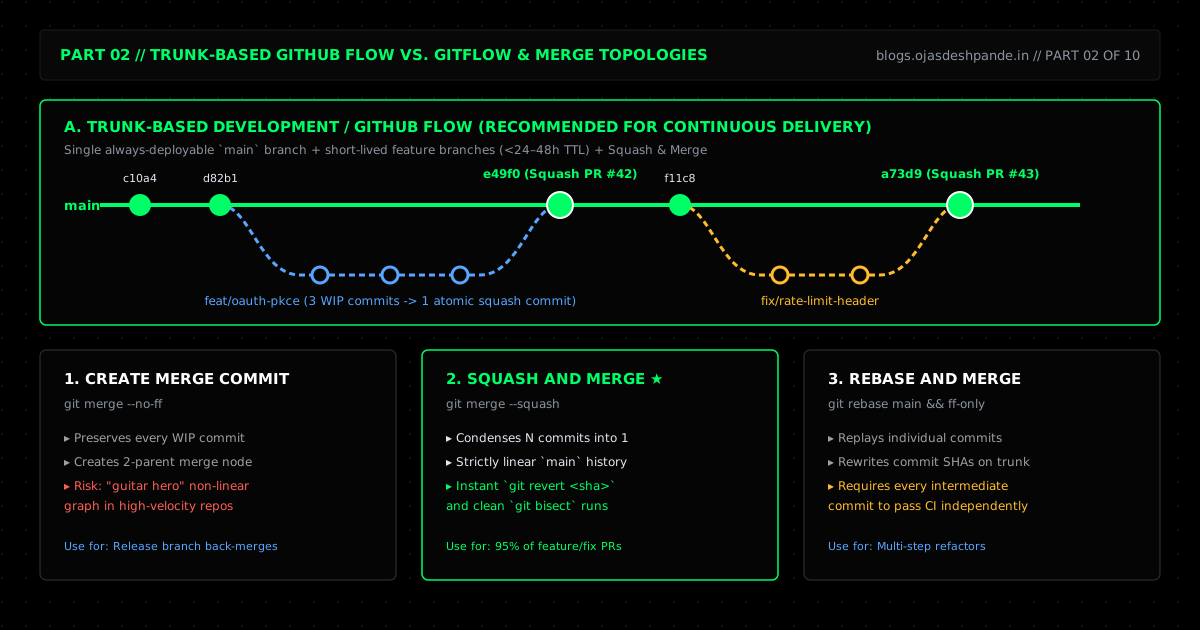
1. Trunk-Based GitHub Flow vs. GitFlow
For years, GitFlow was the default diagram in every tutorial: a main branch, a parallel long-lived develop branch, feature/* branches, release/* branches, and hotfix/* branches. GitFlow made sense when software was shipped on physical media or quarterly release schedules. For web services and cloud apps deploying multiple times a day, it creates a huge problem: long-lived branch drift. Developers merge into develop for weeks, everything diverges from production, and release day turns into a painful multi-hour conflict resolution session.
GitHub Flow (Trunk-Based Development) strips this down to what actually works for continuous delivery:
mainis the single source of truth and is always deployable.- You branch directly off
mainusing short descriptive names (feat/oauth-pkce,fix/webhook-timeout). - Branches stay short-lived—ideally merged within 24 to 48 hours.
- If a feature takes two weeks to build, you merge small pieces into
mainbehind a feature flag instead of hiding on a branch for two weeks. - Release branches (
release/v2.4) are only created if you maintain versioned SDKs, CLI binaries, or on-premise software where customers run older major versions.
2. Merge Commit vs. Squash vs. Rebase
GitHub gives you three ways to merge a pull request. Picking the right default makes a massive difference to how readable your git log is six months later:
- Create a Merge Commit (
git merge --no-ff): Keeps every intermediate commit from the PR branch ("wip", "fix lint", "oops") and ties them tomainwith a two-parent merge commit. In a busy repo, this creates a tangled "guitar hero" graph that makesgit logandgit bisectpainful to read. - Squash and Merge (
git merge --squash) — Best Default for Most Teams: Combines all commits from the PR into one clean commit onmain(for example,feat(auth): add passkey enrollment (#142)). Every commit onmainrepresents one complete, tested PR. If PR#142causes an issue in production, reverting the whole thing takes one command:git revert <sha>. - Rebase and Merge (
git rebase main): Replays each individual commit from the PR onto the tip ofmain. This keeps the history linear without squashing, which is useful when a PR contains a few distinct, well-crafted commits (like a database migration commit followed by an API change). The catch is that every intermediate commit ought to pass tests on its own.
3. Keeping Branches Clean Before You Merge
When you need to update your feature branch with new changes from main, rebase onto origin/main instead of merging main into your branch over and over.
If you want to fold small review fixes into an earlier commit on your branch, use --fixup and --autosquash:
# Mark a commit as a fixup for an earlier commit SHA
git commit --fixup 7f2d08b

# Rebase onto main and automatically fold the fixup commit into 7f2d08b
git fetch origin
git rebase -i --autosquash origin/main
Because rebasing rewrites the commit SHAs on your branch, you have to force-push to update your PR. Never use raw git push --force. If a teammate pushed a commit to your PR branch five minutes ago, --force will silently wipe it out. Always use --force-with-lease --force-if-includes, which checks that your local copy of the remote branch matches what is actually on GitHub before overwriting anything.
4. Real-World Walkthrough: Finding a Regression with git bisect and Shipping a Hotfix
Suppose version v3.2.0 goes out to production and checkout webhooks start failing intermittently. Forty commits landed between v3.1.0 (which worked) and v3.2.0 (which is broken).
Step 1: Let git bisect run Find the Bad Commit Automatically
Instead of reading through 40 commits by hand, give git bisect a test command. It will binary-search the commit history in O(log2 N) steps—testing at most 6 commits out of 40 to pinpoint the exact culprit:
# Start bisect between the broken tag (v3.2.0) and the last known good tag (v3.1.0)
git bisect start v3.2.0 v3.1.0

# Run the failing unit test automatically at each step
git bisect run npm test -- tests/webhooks/checkout-signature.spec.ts

# Git prints the exact commit that broke the test:
# d4e81a29f01b3c4d5e6f7a8b9c0d1e2f3a4b5c6d is the first bad commit
#     refactor(crypto): switch HMAC buffer encoding (#389)

# Exit bisect mode back to main
git bisect reset
Step 2: Fix main First, Then Cherry-Pick to the Release Branch
When patching a production bug, always merge the fix into main first so the bug cannot sneak back into the next release. If you also maintain a release/v3.2 branch, use git cherry-pick -x to copy the merged commit over (the -x flag appends (cherry picked from commit <sha>) to the message so you can trace where it came from):
# 1. Branch off main, fix the bug, and push PR #412
git switch -c fix/hmac-utf8-encoding main
git add src/crypto/hmac.ts tests/webhooks/checkout-signature.spec.ts
git commit -m "fix(crypto): preserve raw body buffer before HMAC-SHA256 digest"
git push -u origin fix/hmac-utf8-encoding

# 2. Once PR #412 is squash-merged into main (say as commit 8f91c2a),
#    cherry-pick it onto the release branch:
git fetch origin
git switch release/v3.2
git cherry-pick -x 8f91c2a
git tag -s v3.2.1 -m "Release v3.2.1: Hotfix webhook HMAC buffer encoding"
git push origin release/v3.2 --follow-tags
Step 3: Update Any Open Feature Branches
git switch feat/stripe-tax-v2
git fetch origin
git rebase origin/main
git push --force-with-lease --force-if-includes
Quick Checklist
- Default to Squash & Merge on
main: Enable Squash and Merge and Automatically delete head branches in your repo settings somainstays linear and merged branches get cleaned up automatically. - Keep feature branches under 2 days: Ship large features incrementally behind feature flags instead of letting branches diverge for weeks.
- Add a
pushfalias: Rungit config --global alias.pushf "push --force-with-lease --force-if-includes"so you never run a blindgit push -fagain.
Series Navigation: ← Previous: Part 1: Git vs. GitHub & Workspace Foundations | Next: Part 3: Mastering Pull Requests & Code Reviews → | All Articles