
Part 3: Mastering Pull Requests & Code Reviews
 Ojas Deshpande
Part 3: Mastering Pull Requests & Code Reviews
In Part 2, we set up a trunk-based workflow with short-lived branches. That workflow only moves fast if pull requests get reviewed quickly and accurately. In practice, code reviews usually fail in one of two ways: someone opens a 1,800-line PR that gets a rubber-stamp "LGTM" because nobody has time to read it, or a 40-line PR sits blocked for three days waiting on the wrong reviewer.
Here is how to set up your repository so PRs stay small, route to the right people automatically, and never break main.
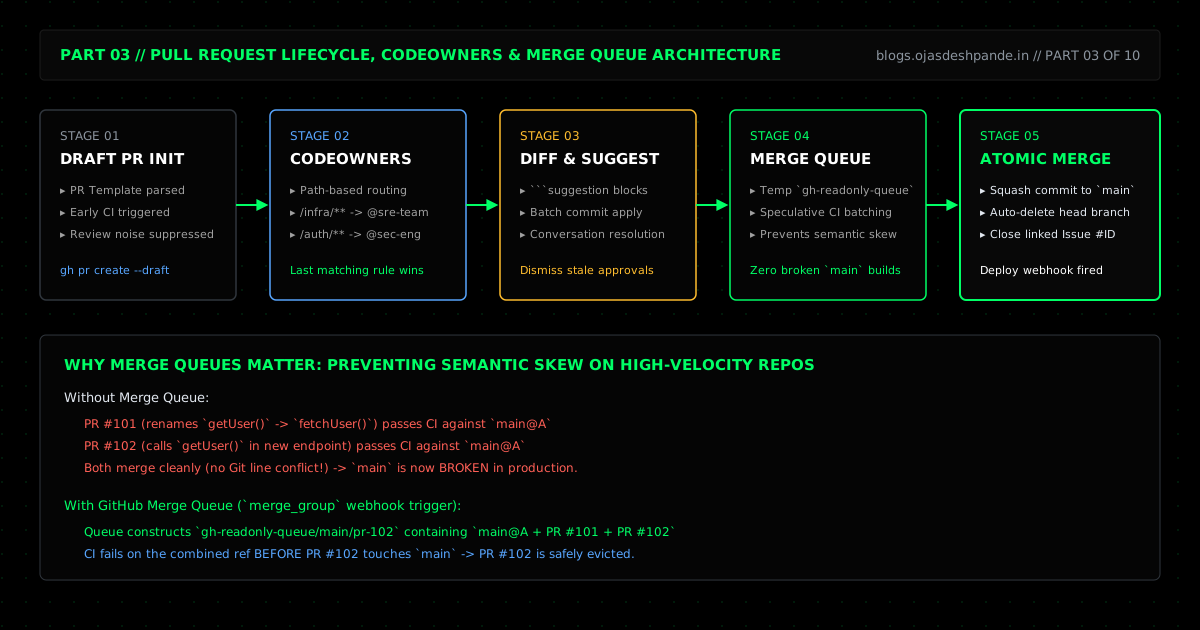
1. Draft PRs & Short PR Templates
If you want early CI feedback or want to show a teammate an approach before the code is finished, open a Draft PR (gh pr create --draft). Draft PRs run your GitHub Actions checks right away, but they hold off on pinging CODEOWNERS and cannot be merged by accident until you mark them ready.
To make reviews faster, add a short .github/pull_request_template.md. Keep it brief—if a template has twenty checkboxes, engineers will just ignore it. Focus on three things:
- Why this change is needed (and the linked issue, like
Closes #142). - How you verified it (test command, screenshot, or curl output).
- Rollout notes (migrations, env vars, or feature flags).
2. Routing Reviews Automatically with .github/CODEOWNERS
A .github/CODEOWNERS file tells GitHub which team owns which paths in the repository. When you enable "Require review from Code Owners" in your branch ruleset, any PR touching those files must be approved by that team before it can merge.
Two rules to keep in mind when writing CODEOWNERS:
- Last matching rule wins: GitHub reads
CODEOWNERSfrom top to bottom. Put your general fallback rule (*) at the top and your specific overrides (/Backend/**,/.github/workflows/**) at the bottom. - Use
@org/teamhandles instead of individuals: If you assign ownership to@aliceand Alice goes on vacation, nobody can merge changes to that folder. Always pointCODEOWNERSto team handles.
# .github/CODEOWNERS
# Default owner for the repo
*                                      @Ace-Vector-Labs/engineering-core

# Frontend styles and static generator
/Frontend/css/                         @Ace-Vector-Labs/design-systems
/Frontend/build.py                     @Ace-Vector-Labs/platform-eng

# Backend, infra, and CI workflows (last match wins)
/Backend/**                            @Ace-Vector-Labs/backend-leads
/wrangler.jsonc                        @Ace-Vector-Labs/sre-team
/.github/workflows/**                  @Ace-Vector-Labs/secops @Ace-Vector-Labs/sre-team
/.github/CODEOWNERS                    @Ace-Vector-Labs/secops
Notice the last two lines: .github/workflows/** and .github/CODEOWNERS itself are owned by @Ace-Vector-Labs/secops. Without that, someone with write access could edit CODEOWNERS or a CI workflow in their own PR to bypass checks.
3. Using suggestion Blocks in Reviews
When reviewing a PR, if you spot a typo, a cleaner variable name, or a missing guard clause, don't just leave a comment asking the author to switch branches, edit the file, and push again. Wrap the replacement code in a Markdown suggestion block inside your review comment. The author can click Add suggestion to batch in the GitHub UI and commit all review fixes in one click.
4. Fixing Merge Conflicts with zdiff3
Standard Git conflict markers only show two things: what is on HEAD and what is on your branch. They hide the most helpful piece of context: what the code looked like before either branch touched it.
Turning on zdiff3 adds a middle ||||||| merged common ancestors section to every conflict:
git config --global merge.conflictStyle zdiff3Here is what a conflict looks like in Backend/worker.js with zdiff3 enabled:
<<<<<<< HEAD
const RATE_LIMIT = { maxRequests: 50, windowSeconds: 120 };
||||||| merged common ancestors
const RATE_LIMIT = { maxRequests: 50, windowSeconds: 60 };
=======
const RATE_LIMIT = { maxRequests: 100, windowSeconds: 60, burst: 20 };
>>>>>>> feat/burst-rate-limit
Because you can see the original line in the middle (maxRequests: 50, windowSeconds: 60), you don't have to guess who changed what. HEAD bumped windowSeconds from 60 to 120, and your branch bumped maxRequests to 100 and added burst: 20. You combine both ({ maxRequests: 100, windowSeconds: 120, burst: 20 }), run git add Backend/worker.js, and continue.
5. Why High-Velocity Repos Need a Merge Queue
Even when two PRs have zero Git conflict markers, they can still break main when merged together:
1. PR #101 renames getUser() to fetchUser() across the codebase. It passes CI against main.
2. PR #102 adds a new endpoint that calls getUser(). It also passes CI against main.
3. PR #101 merges. Two minutes later, PR #102 merges cleanly because it touched a different file.
4. main is now broken in production because PR #102 is calling a function that PR #101 just renamed.
GitHub Merge Queues prevent this. Instead of merging straight into main, clicking Merge when ready (gh pr merge --squash --auto) puts your PR into a queue. GitHub creates a temporary branch (gh-readonly-queue/main/pr-102) that combines main + PR #101 + PR #102 and runs your CI workflows via the merge_group trigger. When PR #102 fails to compile against PR #101's rename, the queue drops PR #102 back to the author before it ever touches main.
Quick Checklist
- Keep PRs under ~400 lines: Smaller PRs get reviewed in minutes instead of days and catch far more logic bugs.
- Turn on
merge.conflictStyle zdiff3: Seeing the common ancestor makes 3-way merge conflicts much easier to reason about. - Add
merge_groupto your CI workflows: If you enable GitHub Merge Queues, make sure your required Actions workflows trigger on bothpull_requestandmerge_group.
Series Navigation: ← Previous: Part 2: Branching Strategies & The Real-World GitHub Flow | Next: Part 4: Issues, Milestones, and GitHub Projects → | All Articles