
Part 4: Issues, Milestones, and GitHub Projects
 Ojas Deshpande
Part 4: Issues, Milestones, and GitHub Projects
Nothing drains engineering energy faster than spending half an hour every morning updating ticket statuses in an external project tracker that is completely disconnected from your code. When your issue tracking lives in GitHub Issues and GitHub Projects V2, your branches, commits, and pull requests update the board for you.
In Part 3, we covered pull request workflows. Now let's set up structured issue intake and automated project tracking.
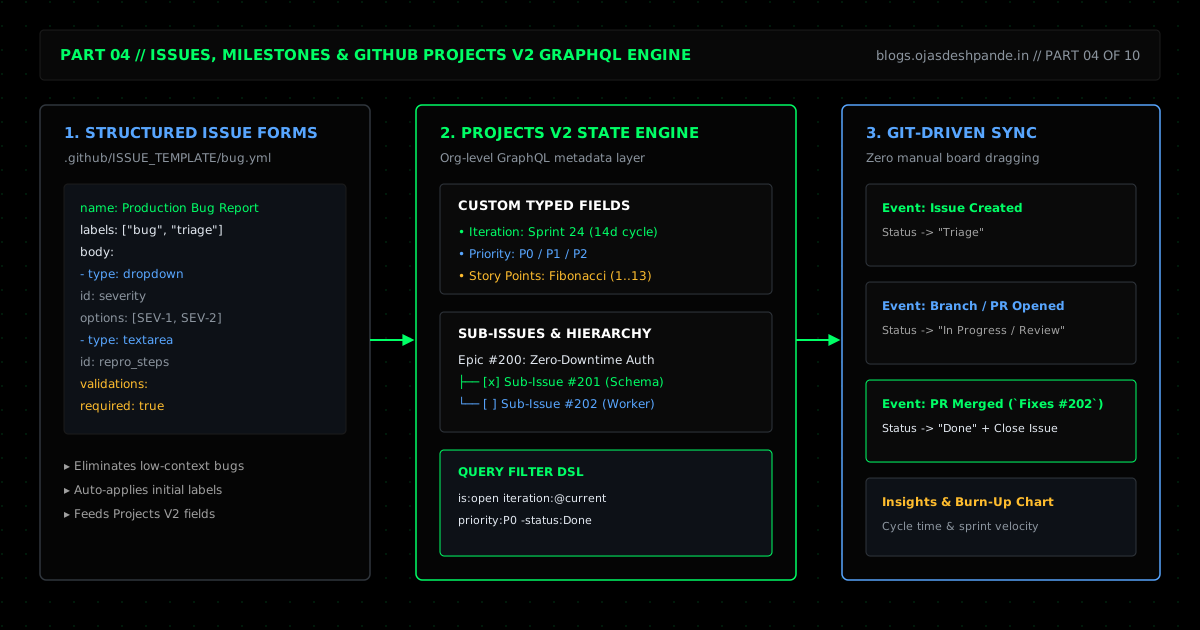
1. YAML Issue Forms Instead of Blank Text Boxes
Old Markdown issue templates (.github/ISSUE_TEMPLATE/bug.md) just pre-fill a text box. People routinely delete the prompts and submit a one-line issue that says "login doesn't work".
YAML Issue Forms (.github/ISSUE_TEMPLATE/*.yml) replace that freeform text box with actual form fields—dropdowns, text inputs, checkboxes, and required validations. Pair them with .github/ISSUE_TEMPLATE/config.yml (blank_issues_enabled: false) so every bug report comes in with a severity level, version number, and reproduction steps, while general questions get redirected to Discussions or your security advisory page.
2. Sub-Issues, Milestones, and Projects V2
- Sub-Issues: GitHub Issues natively support parent-child Sub-Issues (up to 8 levels deep) and organization Issue Types (
Bug,Feature,Task,Incident). You can create one parent issue for a large feature, break it into 5 sub-issues across your backend and frontend repos, and watch the parent issue's completion bar update as each sub-issue's PR merges. - Milestones vs. Iterations: Use repository Milestones for release targets (
v2.5.0,Q4 Security Audit). Use Projects V2 Iteration fields for recurring timeboxes like 2-week sprints. - Projects V2 Views & Filters: A single GitHub Project can pull in issues and PRs from multiple repositories and display the exact same items as a Table, a Kanban Board, or a Roadmap grouped by custom fields (
Priority,Iteration,Story Points).
You can filter any Project view using a simple query syntax:
# Open P0/P1 work in the current sprint
is:open iteration:@current priority:P0,P1 -status:"Done"

# PRs waiting on review for more than 3 days
is:pr is:open status:"In Review" updated:<@today-3d
3. Let Git Drive the Board (Fixes #ID)
Nobody on your team should have to drag cards across columns by hand. Combine GitHub's built-in closing keywords (Fixes #104, Closes #104, or Resolves org/repo#104) in your PR descriptions with Projects V2 built-in workflows:
- Issue opened → Added to the Project with
Status: Triage. - PR opened referencing
#104→Statusmoves toIn Review. - PR merged into
main→ Issue#104closes automatically andStatusmoves toDone.
4. Walkthrough: Setting Up a Bug Form and Auto-Triage Workflow
Let's add a validated bug form and a small GitHub Action that adds new issues to a Project board and tags SEV-1 issues as priority:P0.
Step 1: Create .github/ISSUE_TEMPLATE/config.yml and bug_report.yml
# .github/ISSUE_TEMPLATE/config.yml
blank_issues_enabled: false
contact_links:
  - name: Security Vulnerability Report
    url: https://github.com/Ace-Vector-Labs/platform/security/advisories/new
    about: Report security vulnerabilities privately via GitHub Security Advisories.
# .github/ISSUE_TEMPLATE/bug_report.yml
name: "Production Bug Report"
description: "Report a reproducible bug in production or staging."
title: "[BUG]: "
labels: ["type:bug", "triage:pending"]
body:
- type: dropdown
id: severity
attributes:
label: "Severity"
options:
- "SEV-1: Production outage or data loss"
- "SEV-2: Core feature broken, no workaround"
- "SEV-3: Minor bug or workaround available"
validations:
required: true
- type: input
id: version
attributes:
label: "Commit SHA or Release Tag"
placeholder: "e.g., v2.4.1 or a4c91f2"
validations:
required: true
- type: textarea
id: repro
attributes:
label: "Steps to Reproduce"
value: |
1. Send request...
2. Observe response...
validations:
required: trueStep 2: Auto-Add Issues to Projects V2 and Escalate SEV-1 Bugs
# .github/workflows/project-auto-triage.yml
name: Projects V2 Auto-Triage
on:
  issues:
    types: [opened]

permissions:
  issues: write

jobs:
  sync-to-project:
    runs-on: ubuntu-latest
    steps:
      - name: Add Issue to Project Board
        uses: actions/add-to-project@v1.0.2
        with:
          project-url: https://github.com/orgs/Ace-Vector-Labs/projects/4
          github-token: ${{ secrets.PROJECT_AUTOMATION_TOKEN }}

      - name: Escalate SEV-1 Bugs to P0
        if: contains(github.event.issue.body, 'SEV-1')
        env:
          GH_TOKEN: ${{ secrets.PROJECT_AUTOMATION_TOKEN }}
          ISSUE_NUMBER: ${{ github.event.issue.number }}
          REPO: ${{ github.repository }}
        run: |
          gh issue edit "$ISSUE_NUMBER" --repo "$REPO" \
            --add-label "priority:P0" \
            --remove-label "triage:pending"
Quick Checklist
- Turn off blank issues: Set
blank_issues_enabled: falsein.github/ISSUE_TEMPLATE/config.ymland use YAML forms so bug reports always include reproduction steps. - Keep labels clean with prefixes: Stick to four clear label groups:
type:*(bug,feat,chore),priority:*(P0–P3),area:*(api,frontend,infra), andstatus:*(blocked,needs-repro). - Always link PRs with
Fixes #ID: Make it a habit to includeFixes #123in every PR body so issues close and boards update the moment code lands onmain.
Series Navigation: ← Previous: Part 3: Mastering Pull Requests & Code Reviews | Next: Part 5: GitHub Pages, Gists, and Developer Portfolios → | All Articles