
Part 5: GitHub Pages, Gists, and Developer Portfolios
 Ojas Deshpande
Part 5: GitHub Pages, Gists, and Developer Portfolios
After setting up code reviews and project tracking in Part 3 and Part 4, let's look at how to publish documentation sites, share code snippets, and keep a developer profile updated without maintaining extra infrastructure. GitHub Pages, GitHub Gists, and the special <username>/<username> profile repo handle all of this for free when set up properly.
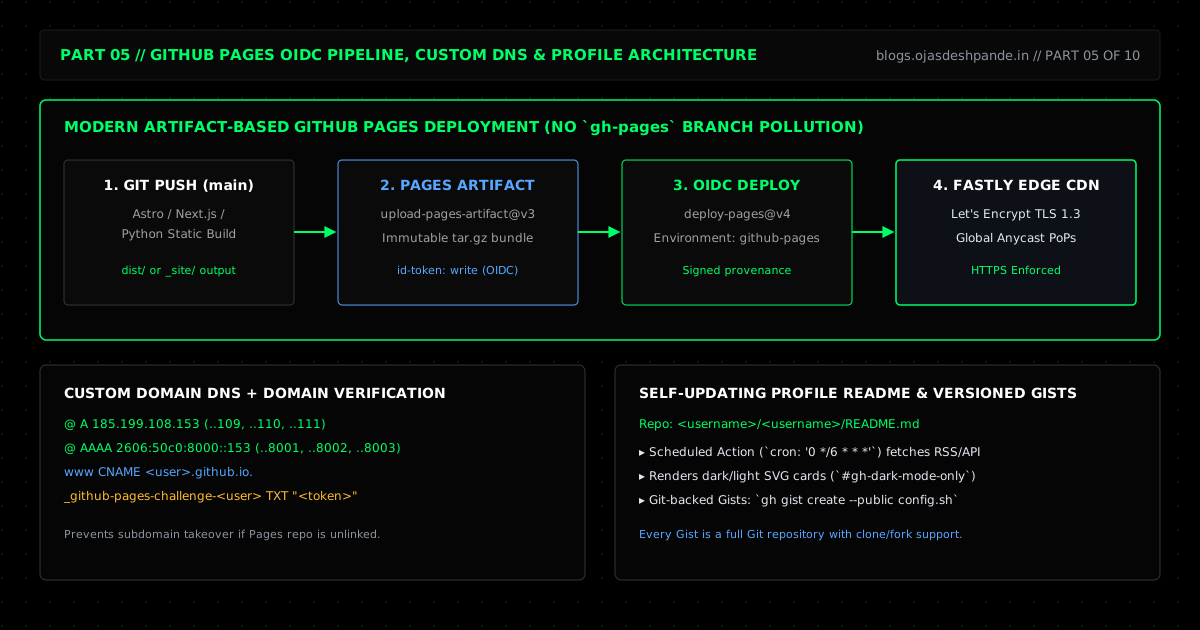
1. Deploying to GitHub Pages Without a gh-pages Branch
The old way of deploying to GitHub Pages was messy: a CI script had to build your site, commit thousands of minified HTML and JS files to a separate gh-pages branch, and push them back to the repo using a Personal Access Token. That bloated your Git history with build output.
Today, GitHub Pages deploys directly from GitHub Actions artifacts (actions/upload-pages-artifact@v3 and actions/deploy-pages@v4):
- Clean Git history: Your static site generator (Astro, Next.js static export, VitePress, or a Python script) builds into a
dist/folder on the runner, bundles it as a temporary artifact, and deploys straight to GitHub's Fastly CDN. - No tokens to manage: Deployment uses a short-lived OIDC token (
id-token: write) tied to thegithub-pagesenvironment. You don't have to create or rotate any deploy keys.
2. Custom Domains and Preventing Subdomain Takeovers
If you point a custom domain like docs.example.com or example.com to GitHub Pages, make sure you do two things:
- DNS & HTTPS: Point subdomains to
<username>.github.io.using aCNAMErecord (never include the repository name in theCNAMEvalue). For an apex domain (example.com), point fourArecords (185.199.108.153through.111.153) and four IPv6AAAArecords (2606:50c0:8000::153through8003::153) to GitHub's edge IPs, then check Enforce HTTPS in the repo settings. - Verify your domain in GitHub Settings: Suppose you point
docs.company.comtocompany.github.io, and six months later someone deletes or renames the docs repo but forgets to delete the DNS record. Anyone on GitHub could create a repo claimingdocs.company.comand serve their own page on your subdomain. You can prevent this completely by adding a_github-pages-challenge-<owner>DNSTXTrecord under Settings → Pages → Verified domains.
3. Gists and Self-Updating Profile READMEs
- GitHub Gists (
gh gist): Every Gist is actually a full Git repository that you can clone, fork, and version. From the terminal,gh gist create --public repro.shis the fastest way to share a bug reproduction or config file. One important caveat: "Secret" Gists are only unlisted—anyone with the URL can view them, so never put API keys or passwords in a secret Gist. - Your
<username>/<username>Profile Repo: If you create a public repository with the exact same name as your GitHub username, itsREADME.mdappears at the top of your GitHub profile. You can use a scheduled GitHub Action to keep a "Latest Blog Posts" section in that README updated automatically from your RSS feed.
4. Walkthrough: OIDC Pages Deployment & Auto-Updating Your Profile README
Step 1: Deploy a Static Site via .github/workflows/deploy-pages.yml
First, go to Settings → Pages in your repo and set Build and deployment → Source to GitHub Actions. Then add this workflow:
# .github/workflows/deploy-pages.yml
name: Deploy to GitHub Pages

on:
  push:
    branches: [main]
  workflow_dispatch:

permissions:
  contents: read
  pages: write
  id-token: write

concurrency:
  group: "pages-deploy"
  cancel-in-progress: false

jobs:
  build:
    runs-on: ubuntu-latest
    steps:
      - uses: actions/checkout@v4
      - uses: actions/setup-node@v4
        with:
          node-version: 22
          cache: "npm"

      - name: Build static site
        run: |
          npm ci
          npm run build
          cp dist/index.html dist/404.html

      - name: Upload Pages artifact
        uses: actions/upload-pages-artifact@v3
        with:
          path: ./dist

  deploy:
    needs: build
    runs-on: ubuntu-latest
    environment:
      name: github-pages
      url: ${{ steps.deployment.outputs.page_url }}
    steps:
      - name: Publish to GitHub Pages
        id: deployment
        uses: actions/deploy-pages@v4
Step 2: Sync Your Latest Blog Posts into Your Profile README.md
Add <!-- BLOG-POST-LIST:START --> and <!-- BLOG-POST-LIST:END --> inside your <username>/<username>/README.md. Then run this small Python script on a cron schedule (cron: '0 */12 * * *') to pull your latest 5 posts from feed.xml:
# scripts/update_readme_feed.py
import re
import urllib.request
import xml.etree.ElementTree as ET

FEED_URL = "https://www.blogs.ojasdeshpande.in/feed.xml"
README_PATH = "README.md"

with urllib.request.urlopen(FEED_URL, timeout=10) as resp:
    root = ET.fromstring(resp.read())

items = root.findall("./channel/item")[:5]
bullets = [
    f"- [{item.findtext('title')}]({item.findtext('link')})"
    for item in items
]
replacement = (
    "<!-- BLOG-POST-LIST:START -->\n"
    + "\n".join(bullets)
    + "\n<!-- BLOG-POST-LIST:END -->"
)

with open(README_PATH, "r", encoding="utf-8") as f:
    content = f.read()

updated = re.sub(
    r"<!-- BLOG-POST-LIST:START -->.*?<!-- BLOG-POST-LIST:END -->",
    replacement,
    content,
    flags=re.DOTALL,
)

if updated != content:
    with open(README_PATH, "w", encoding="utf-8") as f:
        f.write(updated)
Quick Checklist
- Use Actions artifacts for GitHub Pages: Drop the old
gh-pagesbranch workflow and useactions/upload-pages-artifact+actions/deploy-pageswithid-token: write. - Verify custom domains with a TXT record: Add
_github-pages-challenge-*in your DNS settings so nobody can claim your subdomain if a repo is renamed or removed. - Support dark and light mode in README diagrams: Use
<picture><source media="(prefers-color-scheme: dark)" srcset="dark.svg"><img src="light.svg" alt="..."></picture>so diagrams stay readable on any theme.
Series Navigation: ← Previous: Part 4: Issues, Milestones, and GitHub Projects | Next: Part 6: GitHub Actions I — CI/CD Pipeline Fundamentals → | All Articles