
Part 9: GitHub Copilot & Next-Gen Developer Productivity
 Ojas Deshpande
Part 9: GitHub Copilot & Next-Gen Developer Productivity
When people complain that AI coding tools generate buggy or out-of-place code, the root cause is almost always missing repository context. Out of the box, an LLM does not know your repo's build script, your custom CSS variables, which libraries you ban, or how your backend handles errors. Without that context, it guesses—and often guesses wrong.
In Part 8, we looked at automated security checks. Now let's look at how to configure GitHub Copilot so it actually understands your codebase across your IDE, terminal, pull requests, and background agent runs.
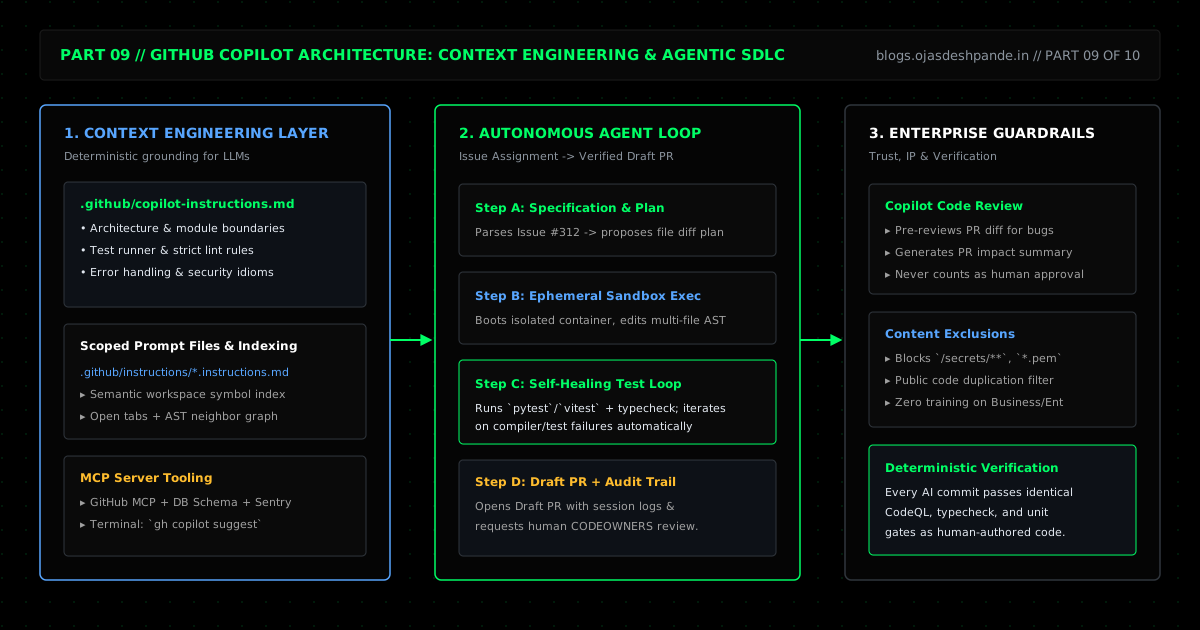
1. Giving Copilot Real Context (.github/copilot-instructions.md)
Instead of repeating the same rules in every chat prompt ("don't use Tailwind, use our CSS variables; run pytest with these flags"), commit a .github/copilot-instructions.md file to your repository. GitHub automatically includes this file in every Copilot Chat, inline edit, PR review, and Coding Agent session.
A good instruction file is short and specific. Skip generic advice like "write clean code" and write down the exact rules a new engineer on your team would need on day one:
- How to build and test the project (
python3 Frontend/build.py). - Where key files live (
Frontend/,Backend/worker.js). - Hard rules and things not to do (for example: "Python standard library only; do not add pip dependencies").
If your repo has different stacks in different folders, you can also add path-specific instruction files under .github/instructions/*.instructions.md using applyTo: frontmatter so backend rules only load when editing Backend/** and frontend rules only load when editing Frontend/**.
2. Using Copilot in the Terminal (gh copilot)
Nobody memorizes every flag for git log, jq, ffmpeg, or awk. The GitHub CLI includes gh copilot suggest (which turns plain English into a command you can run) and gh copilot explain (which breaks down what a complex command actually does before you run it).
# Ask for a git command to find signed commits that touched build.py in the last 30 days
gh copilot suggest -t git "show commits in the last 30 days that modified Frontend/build.py with signature status"

# Check what a complex git or jq command does before running it
gh copilot explain "git log --pretty=format:'%h %G? %an: %s' -S 'inject_adsense_inline_slots' -- Frontend/build.py"
3. AI Code Review & Autonomous Coding Agents
- First-Pass PR Reviews: Asking Copilot to review a PR before tagging teammates is a great way to catch silly mistakes—forgotten null checks, unescaped strings, or typos—in 30 seconds. Just remember that an AI review is a Comment, never a replacement for a human
CODEOWNERSapproval. - Copilot Coding Agent: For well-scoped tasks (like adding unit tests for an existing module, migrating a deprecated API call, or fixing a clearly reproducible bug), you can assign a GitHub Issue directly to
@copilot. It spins up an isolated GitHub Actions container, reads.github/copilot-instructions.md, edits the files, runs your test suite to verify its own changes, and opens a Draft PR with the full command log attached for you to review.
4. Walkthrough: Writing .github/copilot-instructions.md for This Blog Repo
Here is what a practical .github/copilot-instructions.md file looks like for the exact codebase powering this blog:
# Repository Instructions for GitHub Copilot

## Architecture & Build
- Static blog generator in `Frontend/build.py` (uses Python 3 standard library only; zero external pip packages).
- Markdown sources live in `Frontend/Blogs/.md files Archive/*.md` and compile into `Frontend/Blogs/<slug>.html`, `Frontend/js/blogs-data.js`, `Frontend/sitemap.xml`, and `Frontend/feed.xml`.
- Contact form API runs on Cloudflare Workers (`Backend/worker.js`) configured via `wrangler.jsonc`.

## Verification
- Always run `python3 Frontend/build.py` after editing anything in `Frontend/` and confirm it finishes with zero errors.

## Code & Style Rules
- Escape any metadata or user string before injecting into HTML/XML (`html.escape(..., quote=True)` in Python; `escapeHtml()` in `Frontend/js/main.js`).
- In `Frontend/Blogs/.md files Archive/*.md`, keep each paragraph on a single line and keep the metadata block contiguous at the top of the file.
- Do not add external CSS/JS frameworks; use the CSS variables in `Frontend/css/global.css`.
And a path-scoped instruction file for the Cloudflare Worker in .github/instructions/backend.instructions.md:
---
applyTo: "Backend/**/*.js"
---
- Target the Cloudflare Workers runtime (`export default { async fetch(request, env, ctx) }`).
- Do not import Node.js `fs` or `net` modules.
- Validate `Content-Type: application/json` and origin headers on all POST requests.
Quick Checklist
- Commit
.github/copilot-instructions.md: Keep it under ~50 lines focused on build commands, folder structure, and hard project rules. - Exclude sensitive paths in Org Settings: Use Copilot Content Exclusions in your organization settings so files containing proprietary schemas or internal configs are never sent as context.
- Keep CI and human review gates strict: AI-generated PRs should pass the exact same unit tests, CodeQL scans, and
CODEOWNERSreviews as any human PR.
Series Navigation: ← Previous: Part 8: Security & Supply Chain Defense | Next: Part 10: Open Source Governance & Enterprise Collaboration → | All Articles