
Part 10: Open Source Governance & Enterprise Collaboration
 Ojas Deshpande
Part 10: Open Source Governance & Enterprise Collaboration
Across Parts 1 through 9, we went from local Git objects to automated CI/CD, security scanning, and AI tooling. In this final part, we will cover the workflows you need when working across open-source forks and large enterprise organizations: choosing a license, keeping multi-gigabyte monorepos fast on your laptop, locking down API tokens with Fine-Grained PATs and GitHub Apps, scripting tasks with gh api, and preparing for the official GitHub certification exams.
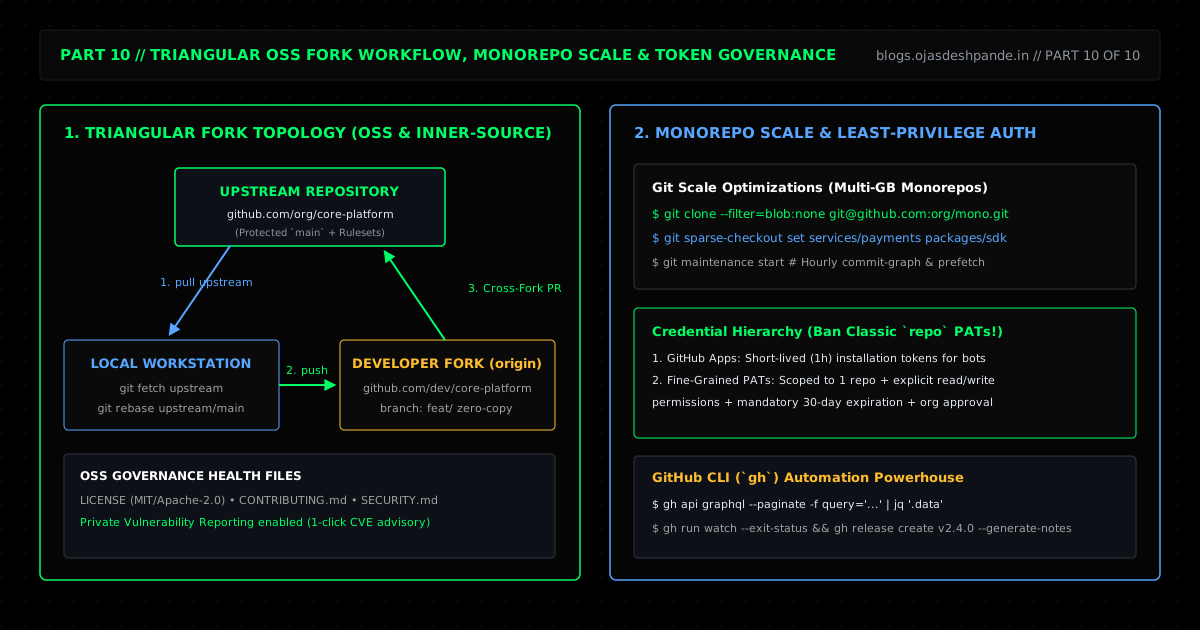
1. Open Source Licenses & The Triangular Fork Workflow
A common misconception on GitHub is that making a repository public makes it open source. It doesn't. Without a LICENSE file, default copyright law applies ("all rights reserved"), which means nobody else can legally use or modify your code in their own projects.
- MIT: Simple and permissive—anyone can use, modify, and ship your code as long as they keep your copyright notice.
- Apache-2.0: Like MIT, but includes an explicit patent grant, which many companies require before adopting an open-source library.
- GPL-3.0 / AGPL-3.0: Copyleft—anyone who distributes modified versions (or hosts them over a network under AGPL) must also release their source code under the same license.
Alongside LICENSE and CONTRIBUTING.md, always add a SECURITY.md file and turn on Private Vulnerability Reporting in your repository settings. That gives security researchers a 1-click button to report bugs privately instead of posting zero-day exploits in public GitHub Issues.
Working with Forks (upstream vs. origin)
When contributing to an open-source project (or an internal repo owned by another team), you don't push branches directly to the main repo (upstream). Instead, you pull changes from upstream, push your feature branch to your own fork (origin), and open a pull request back to upstream:
# Fork the repo and clone it locally with the GitHub CLI
gh repo fork org/core-engine --clone=true
cd core-engine

# Block accidental direct pushes to upstream
git remote set-url --push upstream no_push
git config remote.pushDefault origin

# Sync your local main branch and your fork with upstream in one command
gh repo sync --branch main
2. Keeping Huge Monorepos Fast (--filter=blob:none & sparse-checkout)
If you work in a company monorepo with 500,000 commits and 150 services, running a regular git clone downloads gigabytes of history you don't need, and git status starts lagging. Three built-in Git features fix this:
- Blobless Partial Clone (
git clone --filter=blob:none): Downloads the commit and tree history right away (~50–100 MB), but only downloads actual file contents (blobs) for the files you check out. This cuts clone times by 80–90%. - Sparse-Checkout (
git sparse-checkout): Checks out only the folders your team works on (likeservices/checkout-apiandpackages/crypto-sdk), hiding the other 140 services from your working directory sogit statusand your IDE stay instant. - Background Maintenance (
git maintenance start): Sets up a quiet hourly background job on your OS that prefetches remote objects and updates Git's binary commit-graph index so commands never pause to rungit gcwhile you are working.
# 1. Clone without downloading historical file blobs or checking out files yet
git clone --filter=blob:none --no-checkout git@github.com:Ace-Vector-Labs/monorepo.git
cd monorepo

# 2. Only check out the folders you actually work on
git sparse-checkout init --cone
git sparse-checkout set services/checkout-api packages/crypto-sdk

# 3. Check out main and turn on background commit-graph maintenance
git checkout main
git maintenance start
3. Fine-Grained PATs vs. GitHub Apps
Old Classic Personal Access Tokens (ghp_*) with the repo scope are dangerous: a single repo token gives full read/write access to every private repo your account can see across every organization you belong to.
- Use Fine-Grained PATs (
github_pat_*) for personal scripts: Scope the token to one specific repository (for example, onlyAce-Vector-Labs/docs), grant only the exact permission needed (Contents: Read-only), and set an expiration of 30 days or less. - Use GitHub Apps (
ghs_*) for automation and bots: Never tie company CI/CD pipelines to an employee's personal token—when that employee leaves the company, your pipelines break. A GitHub App acts as a standalone service identity and issues installation tokens that expire automatically after 1 hour.
4. Auditing an Entire Organization with gh api graphql
Instead of clicking through 50 repository settings pages in the browser, you can query GitHub's GraphQL API directly from the terminal with gh api graphql --paginate. For example, this one-liner lists every non-archived repo in an organization and checks whether vulnerability alerts and SECURITY.md policies are enabled:
gh api graphql --paginate -f org="Ace-Vector-Labs" -f query='
  query($org: String!, $endCursor: String) {
    organization(login: $org) {
      repositories(first: 50, after: $endCursor, isArchived: false) {
        pageInfo { hasNextPage endCursor }
        nodes {
          name
          visibility
          isSecurityPolicyEnabled
          hasVulnerabilityAlertsEnabled
          defaultBranchRef { name }
        }
      }
    }
  }
' --jq '.data.organization.repositories.nodes[] | "\(.name)\tVisibility:\(.visibility)\tSecPolicy:\(.isSecurityPolicyEnabled)\tVulnAlerts:\(.hasVulnerabilityAlertsEnabled)"'
Quick Checklist
- Retire Classic
repoPATs: Switch personal CLI tokens to Fine-Grained PATs scoped to single repositories, and use GitHub Apps for all cross-repo automation. - Use
filter: blob:noneon big repos: Pass--filter=blob:nonelocally and setfilter: blob:noneinactions/checkout@v4to speed up CI checkouts. - Turn on Private Vulnerability Reporting: Add a
SECURITY.mdfile and enable private advisory reporting on every public repo.
Where to Go Next: GitHub Certifications & Study Plan
If you have worked through all 10 parts of this series, you already know the material covered on the four official GitHub / Microsoft Certification exams:
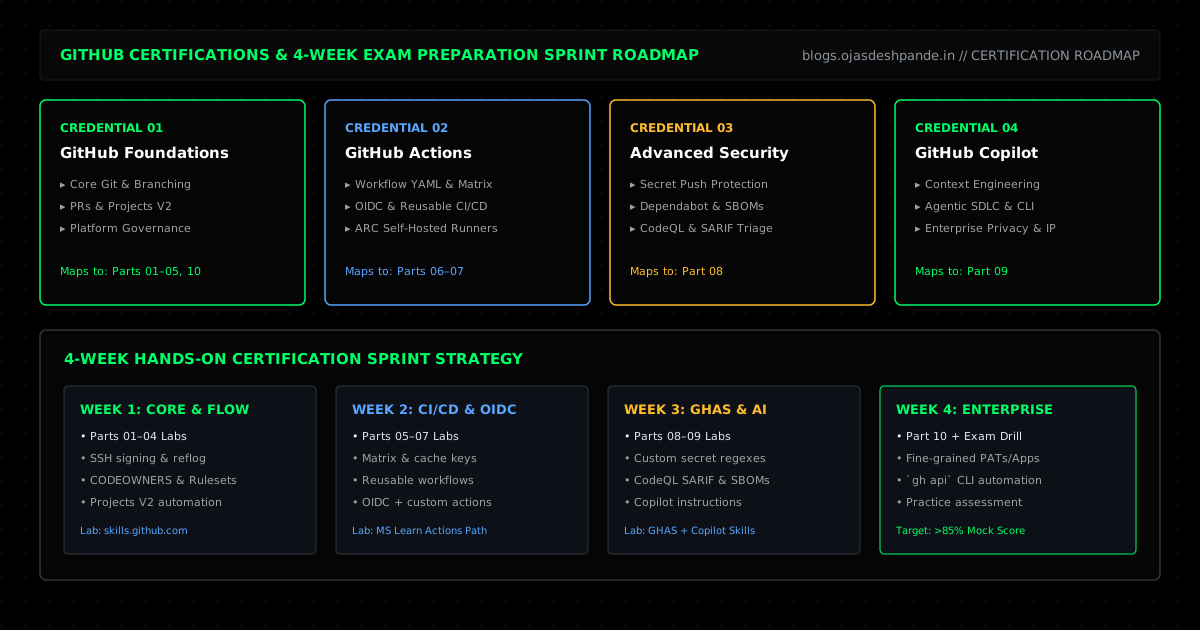
1. GitHub Foundations: Core Git, branching, PRs, Projects, and open-source basics (Parts 01–05, 10).
2. GitHub Actions: CI/CD workflows, matrix builds, caching, reusable workflows, OIDC, and ARC runners (Parts 05–07).
3. GitHub Advanced Security (GHAS): Secret scanning push protection, Dependabot, Dependency Review, and CodeQL (Part 08).
4. GitHub Copilot: Instruction files, Copilot CLI, AI code reviews, and privacy settings (Part 09).
4-Week Exam Prep Plan
Series Navigation: ← Previous: Part 9: GitHub Copilot & Next-Gen Developer Productivity | Back to Start: Series Overview & Certification Roadmap | Browse All Articles